
![Looperlative - Loop Pad [8-Track Stereo Looper]](http://www.noisebug.net/cdn/shop/files/Looperpad.jpg?v=1786660618)
![Looperlative - Loop Pad [8-Track Stereo Looper]](http://www.noisebug.net/cdn/shop/files/LoopPad2.jpg?v=1786660726)
Description
WHAT NO OTHER LOOPER OFFERS:
Eight Independent Stereo Tracks — More Than Any Current Competitor
Eight truly independent stereo loop lanes, each with its own volume, pan, feedback, and playback state. Sync them all to a clock, run them all free, or combine both in a single performance. No current floor looper matches this track count.
Wireless FLAC Recording to DAW — Capture Your Live Performance Without a Cable
While performing, the Loop Pad can wirelessly send each track as an individual FLAC audio file to your computer. Open your DAW after the show and your multitrack performance is already there, separated by track, ready to mix. No audio interface, no USB cable, no extra steps.
Up to 8 Functions Per Single Button Press
One pad press can trigger a sequence of up to eight separate commands simultaneously. Select a track, erase it, reset feedback, and set it as the clock source — all in one press. Build complex performance choreography into a single moment. The possibilities scale with your imagination.
Generative Playback: Random Restart
Set a track to play once, then pause for a randomly chosen interval before playing again. Each time the interval is different. Loops become unpredictable. Performances become alive. This is a compositional tool that turns recorded audio into something that behaves more like improvisation than playback.
Scramble — Creative Audio Destruction in Real Time
Fast Scramble, Medium Scramble, and Slow Scramble rearrange and fragment your recorded loops in real time. Ostinato functions create rapid repetitive micro-loops from your recorded material. These are performance-grade texture tools that are unique to the Looperlative ecosystem and have no equivalent in any current mainstream looper.
Built-In Harmonic Synthesis Functions
Twelve assignable harmonic interval commands — major and minor 2nds, 3rds, 6ths, 7ths, perfect 4ths and 5ths, octave, diminished 5th, and original note — let the Loop Pad generate harmonic content from your loop material. Solo instrument performers, vocalists, and sound designers gain an on-board harmonist without external gear.
Mixed Sync and Async in a Single Performance
Run some tracks locked to a clock, others completely free, simultaneously. Steady rhythmic loops stay together while ambient, evolving layers drift independently. This is how live looping is actually performed — and the Loop Pad is built for it at its architecture level, not bolted on as an afterthought.
8 Fully Programmable Color Banks — 120 Total Assignable Functions
Eight color-coded preset banks, each with 15 fully assignable buttons (one is always the bank selector), gives you 120 total programmable pad functions. Switch between your verse configuration, your chorus configuration, your ambient soundscape rig, and your reset state by pressing one button. Save all eight banks as a named configuration and load different configurations for different shows.
Physical Orientation Flexibility
The 16-button pad surface can rotate to four orientations with a single button press, accommodating cables coming from any direction and allowing the device to be mounted, tilted, or placed in any position relative to the performer. Build your rig without redesigning your cabling. Tour with the same unit in venues where your setup changes every night.
Stretch to 200%, Shrink to 50%, Multiply, Half Speed
Time-stretch and multiply functions let you double or halve the length of a recorded loop, stretch it to twice its original duration, or compress it to half. Multiply a short phrase into a longer structure. Half-speed a melody for texture. These are compositional tools that most loopers relegate to software — the Loop Pad makes them available in real time, on stage, from a single button.),
Bounce, Copy, and Multi-Track Compositing
Bounce combines multiple tracks into a single loop. Copy duplicates a loop to another track. Set As Result Track defines where bounced content lands. These are DAW-style composition tools in a live looper, enabling you to consolidate a complex eight-track arrangement into a single playable loop for the next section of your performance.
No Registration Required. Automatically Licensed.
Every Loop Pad ships fully licensed. No activation code. No account creation. No registration wall between the user and their instrument. Plug in, connect, play. In an era when hardware increasingly requires account management and cloud dependencies, this is a meaningful statement about what kind of company Looperlative is.
The LoopPad incorporates over 20 years of evolution in looping. The LoopPad is built from the same software base as the current LP1 and LP2, but with a new user interface and a modern hardware set that makes it more powerful and less expensive than the LP1.
Specifications
- Latency below 1ms
- Audio is 48kHz 24-bit samples
- 512MB of running audio memory for a total of over 23 minutes of running audio
- Persistent audio storage on microSD
- Stereo audio in via TRS 1/4" connector
- Stereo audio out via TRS 1/4" connector
- Switch selectable input gain
- Switch selectable output gain
- Power supply is +9VDC 2A (actual power usage varies with use)
- USB MIDI via 4 USB-A ports (supplies power through the USB-A ports if your device is designed to use it)
- 16 silicone-rubber pads arranged as 8 banks of 15 buttons
- Lights under the pads indicate track status, volume & feedback, selected pad bank & WiFi status
- Ethernet DHCP client or DHCP server
- WiFi SoftAP mode
- Fanless design for the quiet studio
- Configuration via Looperlative Configure application available for Windows, MacOS and Linux
BASIC FEATURES:
- Record, overdub, and playback on independent tracks
- Play/Stop with both immediate and sync'd timing options
- Undo and redo
- Track erase
- Volume control per track
- Firmware updates via the companion app or connection method
ADVANCED FEATURES
- MIDI in and out for clock sync and command triggering
- The ability to run loops synchronized to an external clock source
- Stereo input and output
- Wet/dry signal routing options
- The ability to save and recall configurations
- Half speed playback
- Reverse track
- Multiply
- MIDI clock output (not just input)
- The ability to load pre-recorded audio files to a track and trigger them
- A built-in pattern sequencer or drum machine
- Pan control per track
- Expression pedal and external controller support via MIDI or USB
- Stretch and shrink functions
FEATURES SHARED ONLY WITH LOOPERLATIVE'S PRIOR DEVICES (LP1 / LP2)
- Eight independent stereo tracks — shared with LP1, the only prior device to offer this
- Feedback (destructive gradual audio reduction)
- The ability to mix sync'd and asynchronous tracks in a single session
- Wireless FLAC Recording to DAW
WHAT’S IN THE BOX:
- Loop Pad device
- Approved power supply (must be 100-240 VAC 9V 2A center positive)
- An Ethernet cable is NOT included and must be supplied by the user
Support and the firmware download page: https://looperlative.com/support.php
INTRO:
Welcome to the Loop Pad, a Looperlative Audio Products next‑generation looping instrument for solo artists, bands, sound designers and theatres to do live looping, soundscape design and song building in real time.
In this guide, you’ll learn how to power it up, integrate it with the Loop Pad Configure app on your computer, and use the 16 colored LED pads to record, overdub, play and erase your first loops.
The Loop Pad gives you eight independent stereo tracks, plus stereo input and output, so you can build rich, layered performances.
You can use the headings or video chapters to jump around this tutorial
Before we plug it in, let’s take a look at the device.
Side Panel Connections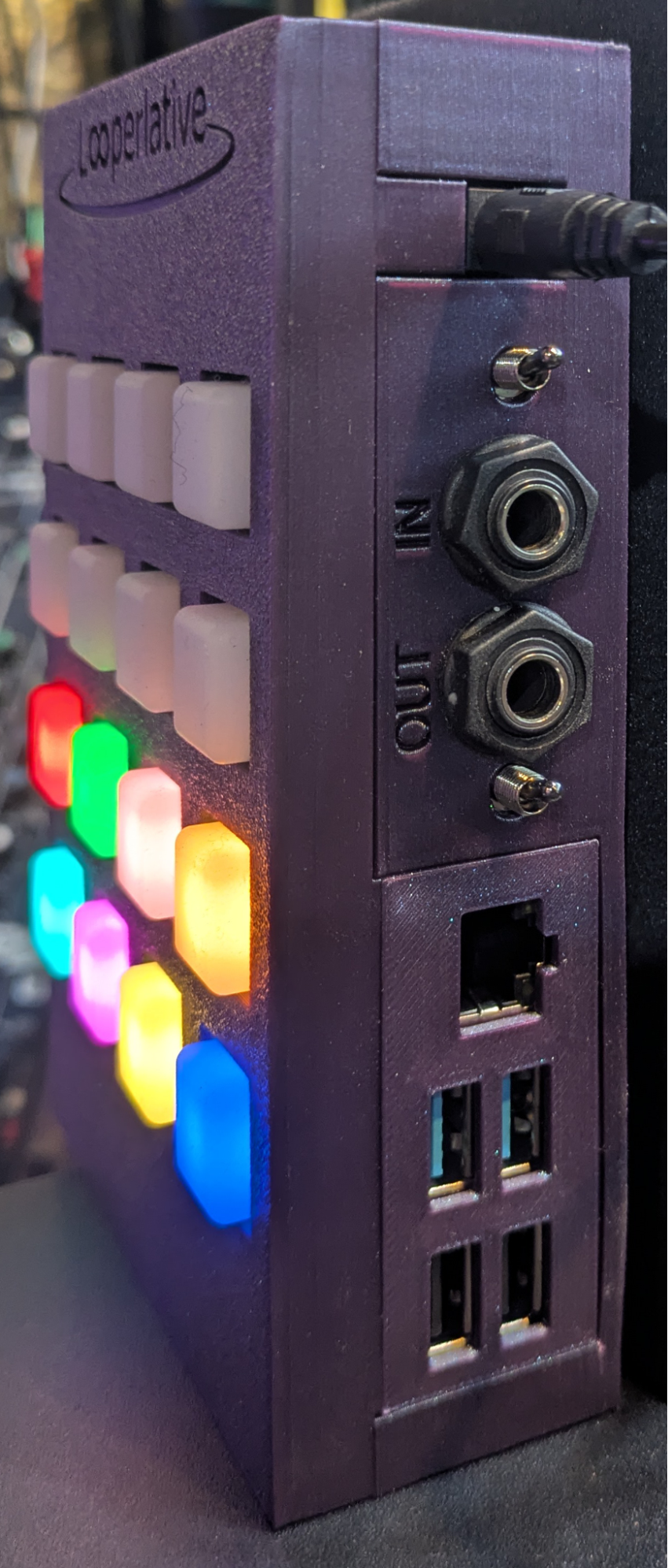
On the side, is the power connector, stereo ¼” inputs and outputs both with toggle switch attenuation. There is an Ethernet port for network and app integration, and four USB ports for connecting controllers, clock sources and other devices. The USB ports are host-mode ports and cannot be used for connecting to a computer.
Midi Controllers, Wireless or Ethernet Connectivity, Wireless Live Capture
In addition to the 16 onboard pad controls, the Loop Pad also works with a wide range of foot and hand controllers. The Loop Pad can communicate wirelessly or via Ethernet with the Looperlative Configure computer application, and it can send your tracks as independent FLAC files wirelessly to your computer while you are recording.
LOOPERLATIVE APP:
Download and Install ‘Configure’ App
A key element of the Looperlative ecosystem is the Looperlative Configure app, which permits the user to observe behavior in realtime and to program the buttons using the app to trigger any of the available functions or commands.
Looperlative - Loop Pad [8-Track Stereo Looper]
$375.00
Description
WHAT NO OTHER LOOPER OFFERS:
Eight Independent Stereo Tracks — More Than Any Current Competitor
Eight truly independent stereo loop lanes, each with its own volume, pan, feedback, and playback state. Sync them all to a clock, run them all free, or combine both in a single performance. No current floor looper matches this track count.
Wireless FLAC Recording to DAW — Capture Your Live Performance Without a Cable
While performing, the Loop Pad can wirelessly send each track as an individual FLAC audio file to your computer. Open your DAW after the show and your multitrack performance is already there, separated by track, ready to mix. No audio interface, no USB cable, no extra steps.
Up to 8 Functions Per Single Button Press
One pad press can trigger a sequence of up to eight separate commands simultaneously. Select a track, erase it, reset feedback, and set it as the clock source — all in one press. Build complex performance choreography into a single moment. The possibilities scale with your imagination.
Generative Playback: Random Restart
Set a track to play once, then pause for a randomly chosen interval before playing again. Each time the interval is different. Loops become unpredictable. Performances become alive. This is a compositional tool that turns recorded audio into something that behaves more like improvisation than playback.
Scramble — Creative Audio Destruction in Real Time
Fast Scramble, Medium Scramble, and Slow Scramble rearrange and fragment your recorded loops in real time. Ostinato functions create rapid repetitive micro-loops from your recorded material. These are performance-grade texture tools that are unique to the Looperlative ecosystem and have no equivalent in any current mainstream looper.
Built-In Harmonic Synthesis Functions
Twelve assignable harmonic interval commands — major and minor 2nds, 3rds, 6ths, 7ths, perfect 4ths and 5ths, octave, diminished 5th, and original note — let the Loop Pad generate harmonic content from your loop material. Solo instrument performers, vocalists, and sound designers gain an on-board harmonist without external gear.
Mixed Sync and Async in a Single Performance
Run some tracks locked to a clock, others completely free, simultaneously. Steady rhythmic loops stay together while ambient, evolving layers drift independently. This is how live looping is actually performed — and the Loop Pad is built for it at its architecture level, not bolted on as an afterthought.
8 Fully Programmable Color Banks — 120 Total Assignable Functions
Eight color-coded preset banks, each with 15 fully assignable buttons (one is always the bank selector), gives you 120 total programmable pad functions. Switch between your verse configuration, your chorus configuration, your ambient soundscape rig, and your reset state by pressing one button. Save all eight banks as a named configuration and load different configurations for different shows.
Physical Orientation Flexibility
The 16-button pad surface can rotate to four orientations with a single button press, accommodating cables coming from any direction and allowing the device to be mounted, tilted, or placed in any position relative to the performer. Build your rig without redesigning your cabling. Tour with the same unit in venues where your setup changes every night.
Stretch to 200%, Shrink to 50%, Multiply, Half Speed
Time-stretch and multiply functions let you double or halve the length of a recorded loop, stretch it to twice its original duration, or compress it to half. Multiply a short phrase into a longer structure. Half-speed a melody for texture. These are compositional tools that most loopers relegate to software — the Loop Pad makes them available in real time, on stage, from a single button.),
Bounce, Copy, and Multi-Track Compositing
Bounce combines multiple tracks into a single loop. Copy duplicates a loop to another track. Set As Result Track defines where bounced content lands. These are DAW-style composition tools in a live looper, enabling you to consolidate a complex eight-track arrangement into a single playable loop for the next section of your performance.
No Registration Required. Automatically Licensed.
Every Loop Pad ships fully licensed. No activation code. No account creation. No registration wall between the user and their instrument. Plug in, connect, play. In an era when hardware increasingly requires account management and cloud dependencies, this is a meaningful statement about what kind of company Looperlative is.
The LoopPad incorporates over 20 years of evolution in looping. The LoopPad is built from the same software base as the current LP1 and LP2, but with a new user interface and a modern hardware set that makes it more powerful and less expensive than the LP1.
Specifications
- Latency below 1ms
- Audio is 48kHz 24-bit samples
- 512MB of running audio memory for a total of over 23 minutes of running audio
- Persistent audio storage on microSD
- Stereo audio in via TRS 1/4" connector
- Stereo audio out via TRS 1/4" connector
- Switch selectable input gain
- Switch selectable output gain
- Power supply is +9VDC 2A (actual power usage varies with use)
- USB MIDI via 4 USB-A ports (supplies power through the USB-A ports if your device is designed to use it)
- 16 silicone-rubber pads arranged as 8 banks of 15 buttons
- Lights under the pads indicate track status, volume & feedback, selected pad bank & WiFi status
- Ethernet DHCP client or DHCP server
- WiFi SoftAP mode
- Fanless design for the quiet studio
- Configuration via Looperlative Configure application available for Windows, MacOS and Linux
BASIC FEATURES:
- Record, overdub, and playback on independent tracks
- Play/Stop with both immediate and sync'd timing options
- Undo and redo
- Track erase
- Volume control per track
- Firmware updates via the companion app or connection method
ADVANCED FEATURES
- MIDI in and out for clock sync and command triggering
- The ability to run loops synchronized to an external clock source
- Stereo input and output
- Wet/dry signal routing options
- The ability to save and recall configurations
- Half speed playback
- Reverse track
- Multiply
- MIDI clock output (not just input)
- The ability to load pre-recorded audio files to a track and trigger them
- A built-in pattern sequencer or drum machine
- Pan control per track
- Expression pedal and external controller support via MIDI or USB
- Stretch and shrink functions
FEATURES SHARED ONLY WITH LOOPERLATIVE'S PRIOR DEVICES (LP1 / LP2)
- Eight independent stereo tracks — shared with LP1, the only prior device to offer this
- Feedback (destructive gradual audio reduction)
- The ability to mix sync'd and asynchronous tracks in a single session
- Wireless FLAC Recording to DAW
WHAT’S IN THE BOX:
- Loop Pad device
- Approved power supply (must be 100-240 VAC 9V 2A center positive)
- An Ethernet cable is NOT included and must be supplied by the user
Support and the firmware download page: https://looperlative.com/support.php
INTRO:
Welcome to the Loop Pad, a Looperlative Audio Products next‑generation looping instrument for solo artists, bands, sound designers and theatres to do live looping, soundscape design and song building in real time.
In this guide, you’ll learn how to power it up, integrate it with the Loop Pad Configure app on your computer, and use the 16 colored LED pads to record, overdub, play and erase your first loops.
The Loop Pad gives you eight independent stereo tracks, plus stereo input and output, so you can build rich, layered performances.
You can use the headings or video chapters to jump around this tutorial
Before we plug it in, let’s take a look at the device.
Side Panel Connections
On the side, is the power connector, stereo ¼” inputs and outputs both with toggle switch attenuation. There is an Ethernet port for network and app integration, and four USB ports for connecting controllers, clock sources and other devices. The USB ports are host-mode ports and cannot be used for connecting to a computer.
Midi Controllers, Wireless or Ethernet Connectivity, Wireless Live Capture
In addition to the 16 onboard pad controls, the Loop Pad also works with a wide range of foot and hand controllers. The Loop Pad can communicate wirelessly or via Ethernet with the Looperlative Configure computer application, and it can send your tracks as independent FLAC files wirelessly to your computer while you are recording.
LOOPERLATIVE APP:
Download and Install ‘Configure’ App
A key element of the Looperlative ecosystem is the Looperlative Configure app, which permits the user to observe behavior in realtime and to program the buttons using the app to trigger any of the available functions or commands.